Restaurant Kitchen Order Accuracy: Why Peak-Hour Errors Happen and How to Fix Them
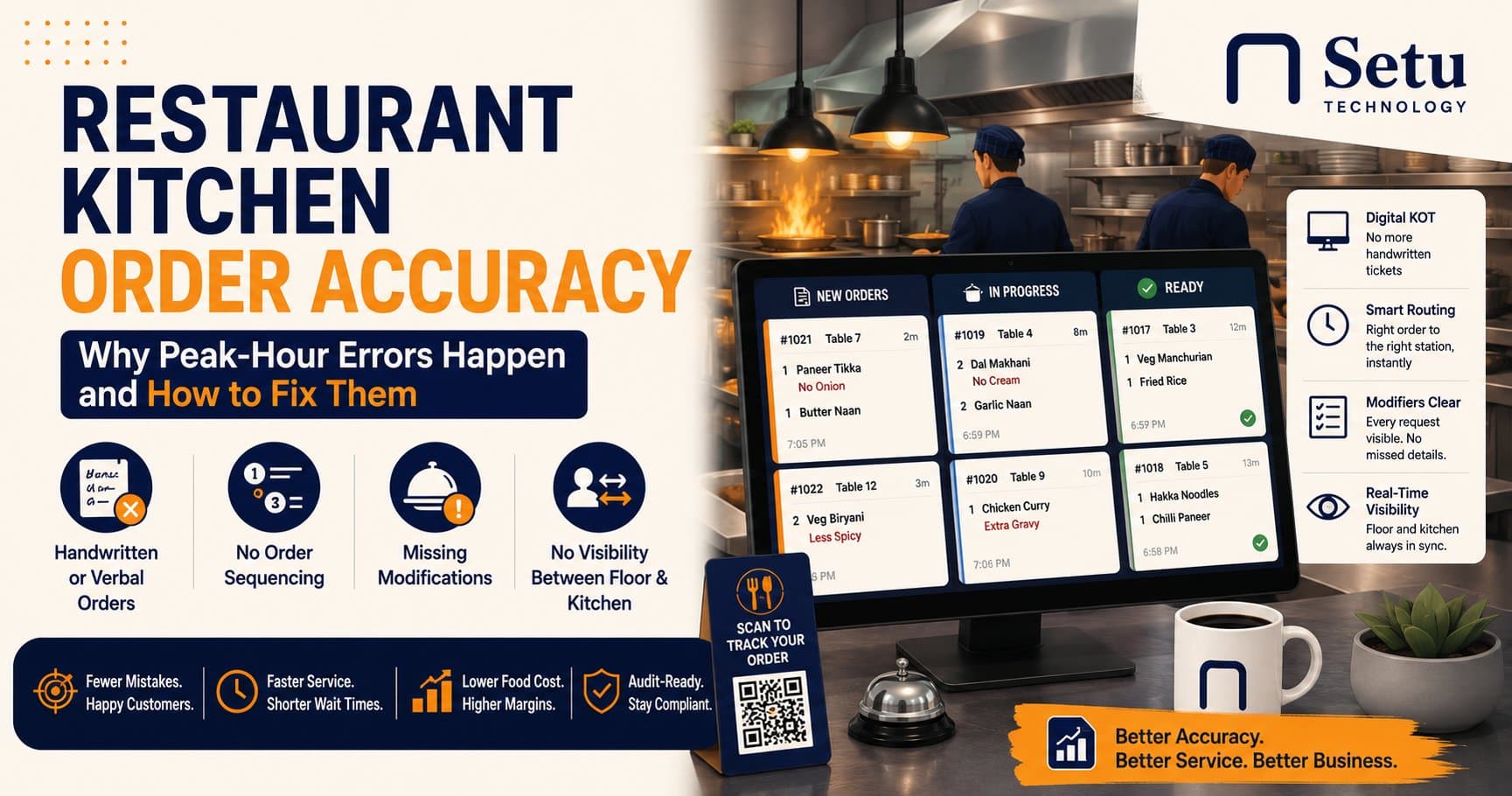
A kitchen that runs smoothly at 3pm on a Tuesday can fall apart completely by 8pm on a Friday. The same staff, the same menu, the same space — but suddenly orders are wrong, tickets are getting lost, and customers are waiting 40 minutes for food that should take 15.
This isn't a staffing problem or a discipline problem. It's a systems problem. And the good news is that most peak-hour kitchen errors come from a small set of root causes that are completely fixable.
Why Friday Evenings Break Kitchens That Run Fine All Week
Under low pressure, kitchen teams compensate for weak systems constantly — and you don't notice, because everything turns out fine. An order comes in verbally, the chef remembers it. A modification isn't written clearly, but the server checks back. A ticket gets buried under another one, but the station notices and pulls it out.
None of this feels like a problem because the kitchen recovers before anything goes wrong.
Add 40 covers at once, three tables with special requests, two new staff members, and noise levels that make shouting across the kitchen unreliable — and every one of those informal recovery mechanisms breaks simultaneously. That's peak hour.
The errors aren't new. The system's ability to hide them just runs out.
The 4 Most Common Causes of Kitchen Order Mistakes
1. Handwritten or Verbally Relayed Orders
Handwritten order tickets work fine when the kitchen isn't busy and the handwriting is legible. Under pressure, two things happen: handwriting degrades, and modifications get abbreviated or dropped entirely.
A customer who ordered "dal makhani, no cream, extra roti" becomes "dal, roti" by the time the ticket reaches the station. The error only surfaces when the dish arrives at the table.
Verbal relay is worse. An order shouted across a kitchen during service has to compete with the noise of cooking, other conversations, and the mental load every staff member is already carrying. Mishearing a single word — "without" becomes "with" — creates a complaint, a remake, and a table that's waiting longer than everyone else.
2. No Order Sequencing
Without a system managing order sequence, kitchens default to cooking whatever is fastest or easiest next. The result is a table that ordered simple dishes waiting 35 minutes while a more complex order that came in 10 minutes later gets plated first.
This feels fair from the kitchen's perspective — they're working constantly — but it's invisible and deeply frustrating from the customer's side. "Why is that table eating when we ordered before them?" is a complaint that has nothing to do with food quality and everything to do with sequence.
Good sequencing means the kitchen always knows what came in first, what's been waiting longest, and what needs to be prioritised.
3. Missing Modifications on Tickets
Modifications are where most complaints live. "No onion," "less spice," "allergy to nuts," "sauce on the side" — these details are often added verbally or written as an afterthought, and are the first thing to disappear when a ticket is rushed.
The problem is compounded when the same dish is on multiple tickets at once. A station cooking three portions of the same item has to track which one has the modification. Without a clear, visible flag on the ticket itself, this is a memory task — and memory fails under pressure.
4. No Visibility Between Front-of-House and Kitchen
When servers don't know the status of an order, they either keep interrupting the kitchen to check, or they wait until a customer asks. Both are inefficient. The kitchen gets interrupted during critical moments; the customer gets poor communication about wait times.
The result is a breakdown in trust between the floor and the kitchen — each side frustrated with the other — that makes the whole service worse.
How a KOT System Solves Each of These Problems
KOT stands for Kitchen Order Ticket. A digital KOT system routes orders electronically from the billing counter or server's device directly to the correct kitchen station the moment they're placed.
Here's how it addresses each problem:
Handwritten orders — eliminated. The order is typed once at the point of taking it and arrives at the kitchen exactly as entered. No transcription, no legibility issues.
Order sequencing — automatic. Orders appear at the station in the order they were received, with timestamps. The kitchen always knows what's oldest and what needs to go first.
Modifications — visible and unforgeable. Special instructions entered at billing appear prominently on the kitchen screen, attached to the specific item they apply to. You can't accidentally miss a modification because it's not a separate note — it's part of the order.
Floor-kitchen visibility — real-time. When a station marks an order as ready, the server gets the update. When an order is taking longer than expected, the floor knows before the customer asks. The back-and-forth interruptions stop.
What to Look for in Kitchen Management Software
Not all KOT systems are equal. When evaluating one for your restaurant, check for:
Station-level routing — orders should go to the correct station (hot kitchen, cold kitchen, tandoor, bar) automatically based on what was ordered, not based on someone manually sorting them.
Modification handling — modifications should be attached to individual items, not added as a general note at the bottom of the ticket where they can be missed.
Order status tracking — the system should show what's been received, what's in progress, and what's ready — both in the kitchen and on the floor.
Speed under load — the interface should be fast and simple enough that kitchen staff can use it without training, and it should perform without lag during peak service.
No app required for customers — QR-based order status tracking that doesn't require customers to download an app reduces friction and frees up server time.
How Setu POS Handles Kitchen Order Routing
Setu POS includes a full kitchen workflow system as a core part of the product — not a paid add-on. Orders placed at the billing counter or table route immediately to the correct kitchen station with modifications intact and sequence preserved.
Floor staff can see order status in real time. Customers at the table can scan a QR code to track their order and call a server for help, without any app or login required.
The Friday evening rush is always going to be busy. The goal isn't to make it calm — it's to remove the avoidable mistakes so your kitchen team can focus on cooking, not recovering from errors.
Frequently asked questions
Under peak load, handwritten chits, verbal orders and modifier changes get lost or misread — the same volume that makes accuracy matter most is what breaks manual order flow.