Petpooja Alternatives in 2026: What Restaurant Operators Are Switching To (And Why)
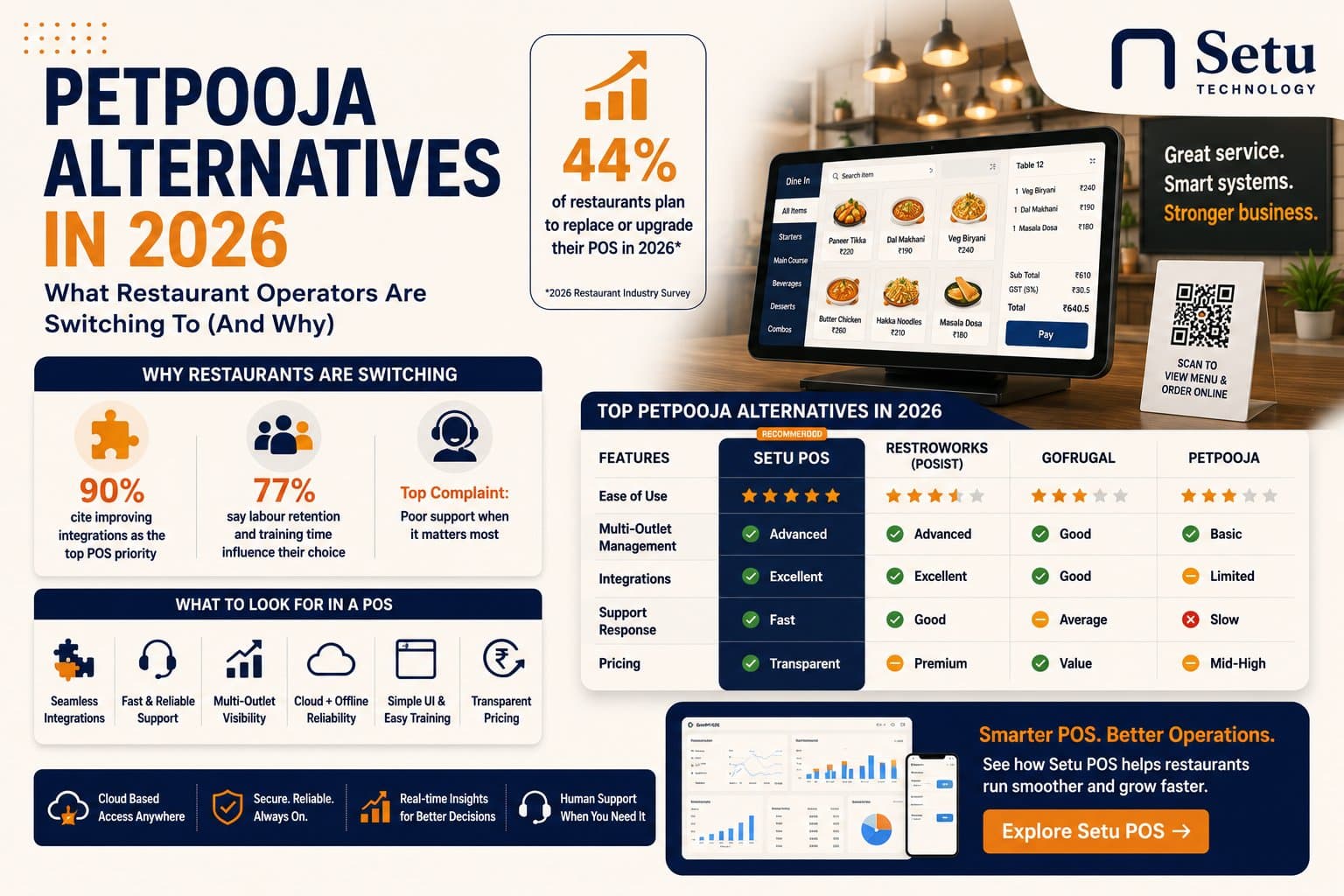
Nearly half the restaurant industry is switching POS systems this year. Not because their current software stopped working — but because it never really worked for them.
If you're searching for Petpooja alternatives, you're part of a large and growing group of restaurant operators who've decided the tool they started with has run out of road. The frustrations are consistent: interfaces that feel like they haven't changed in five years, support that goes quiet exactly when things go wrong, and multi-outlet management that works in theory but creates headaches in practice.
This post covers what's driving the switch, what to actually look for in a replacement, and how the alternatives compare.
Why 44% of Restaurants Are Looking for a New POS in 2026
The industry research is unusually clear this year. In a 2026 survey of restaurant operators:
- 44% plan to replace or significantly upgrade their POS in 2026
- 90% cite improving integrations as their top POS priority
- 77% say labour retention and training time directly influence which software they choose
These aren't abstract preferences. They're specific frustrations that have been accumulating for years and reached a tipping point.
The integrations problem
Restaurants today don't run on a POS alone. They have inventory, kitchen displays, table management, and reporting layered on top. When these don't connect — when your billing system doesn't talk to your kitchen display, or your daily sales data requires a manual export to consolidate — the promise of "going digital" turns into a new kind of manual work.
The support problem
Restaurant problems don't happen at 11am on a Tuesday. They happen at 8pm on a Friday, in the middle of service, with 15 tables occupied. When your POS crashes or behaves unexpectedly at that moment, the quality of the support you get isn't a nice-to-have — it's the difference between a service that recovers and one that falls apart.
The multi-outlet problem
Most restaurant POS systems were built for a single outlet and expanded. Multi-outlet support exists, but it was added, not designed. Operators managing two, five, or ten outlets find themselves doing manual consolidation and working around limitations that wouldn't exist if the system had been built from the ground up for their scale.
What Petpooja Does Well — and Where It Falls Short
Petpooja has a real install base for a reason. It covers billing, menu management, inventory and basic reporting, and it's been used across enough Indian restaurants that most common use cases have been worked through. For a standalone restaurant evaluating a first POS, it's a known quantity.
But the operators who've been on Petpooja for two or three years often describe the same pain points:
Interface complexity. Petpooja's feature set is broad — which means the interface carries a lot of weight. For restaurants that onboard new staff regularly, training time is a real, recurring cost. The more complex the interface, the longer each new staff member takes to become productive.
Multi-outlet visibility gaps. Petpooja was built for single-outlet operators. Multi-outlet features were added as the product grew. Operators running three or more outlets consistently report that cross-outlet reporting and visibility require more manual work than they should.
Support variability. Response quality and speed vary significantly depending on region and timing. For restaurant operators, the value of any support system is determined by how it performs at 8pm on a Friday — not on average.
Feature creep without operator focus. Over time, software that grows to satisfy everyone's requests tends to satisfy no one's core needs particularly well. Many Petpooja users report that the product now has features they've never touched sitting next to workflows they use every day that haven't been improved in years.
What to Actually Look for When Switching
Before evaluating any specific alternative, it's worth being precise about what you're actually solving for. The biggest mistake in any software switch is moving from one tool to another without clarity on which specific failures you're escaping.
1. Speed and reliability under load
The POS needs to work without lag or errors during peak service — not just in a demo. Ask vendors specifically: what happens during a connectivity issue? What's the local-first fallback? How does the system perform with 20 concurrent orders?
2. GST compliance built in, not bolted on
India's restaurant GST structure is complex. Dine-in, takeaway, hotel restaurants, and packaged items have different applicable rates. Any system you evaluate should handle GST configuration per menu category and apply it automatically — not require staff to manually select rates at the counter.
3. Actual multi-outlet capability
If you have or plan to have more than one location, test the multi-outlet dashboard specifically. Ask to see: side-by-side outlet comparison in real time, drill-down to individual outlet performance, and how the system handles a new outlet being added. These tests reveal quickly whether multi-outlet is a core feature or an afterthought.
4. Kitchen workflow
How does the system route orders from billing to the kitchen? Does it support station-level routing? Are modifications attached to specific items or noted separately? Test with a complex order — multiple modifications, items going to different stations — and see how the kitchen display handles it.
5. Training time for new staff
Ask the vendor how long it typically takes a new billing staff member to become productive. Get a reference from a restaurant with similar staff turnover to yours. This is a recurring cost that shows up every time you onboard someone new, and the difference between a two-hour and a two-day onboarding multiplies over a year.
6. Support availability when it matters
Ask specifically: what's the support channel, what are the hours, and what's the typical response time for a critical issue during dinner service? Any vendor that's vague about this is telling you something.
Setu POS: An Operator-First Alternative
Setu POS is built for Indian restaurant operators — from single outlets to chains growing across multiple locations. The product starts from a different assumption than most POS systems: that the people using it are running restaurants, not learning software, and that every minute of friction in the interface is a cost that shows up in the business.
What makes it different
GST built in. Setu POS has a dedicated tax engine for Indian restaurants. Rates are configured once per menu category and applied automatically on every bill — dine-in, takeaway, parcel — with no manual selection required.
Multi-outlet from day one. Multi-outlet management is a core feature of Setu POS, not a later addition. Every outlet runs on the same system, and a single dashboard shows sales, order count and performance across every location in real time — no manual consolidation.
Digital KOT with station routing. Orders placed at the billing counter route instantly to the correct kitchen station, with modifications attached to the specific item. Sequence is preserved. The kitchen display shows what came in first, what's in progress, and what's ready — without anyone having to shout across the kitchen to check.
Fast enough for new staff. The interface is built for speed. Most new billing staff are placing orders within minutes, not hours. This directly reduces training time and the recurring cost of onboarding.
Support that's reachable when it matters. When something goes wrong during service, you need a real person who treats your problem as urgent. Setu POS support is built around that expectation — not around ticket queues and business-hours response windows.
QR customer tracking. Customers at the table can scan a QR code to see their order status and call a server — no app required, no login. This reduces floor interruptions during peak service and improves the customer experience without adding staff workload.
Where Setu POS is today
Setu POS is a focused product. It's built for in-restaurant operations — billing, kitchen workflow, table management and multi-outlet reporting. It's the right choice for operators who want a system designed around how their restaurant actually runs, with support that treats their problem seriously.
Quick Comparison
| Setu POS | Petpooja | POSist (Restroworks) | |
|---|---|---|---|
| GST compliance | Built-in tax engine | Supported | Supported |
| Multi-outlet dashboard | Core feature, real-time | Limited | Strong (enterprise) |
| Kitchen routing (KOT) | Station-level, built-in | Supported | Supported |
| Interface complexity | Simple, fast to learn | Moderate | Complex |
| Support style | Fast response, real humans | Variable by region | Enterprise SLA |
| Best fit | 1–20 outlets, growing chains | Standalone, 1–2 outlets | 10+ outlet enterprises |
The Bottom Line
Switching POS systems is not a small decision — the migration, the staff retraining, the data export and import all take real time. It's worth doing right rather than fast.
If you're evaluating Petpooja alternatives, the key question to ask every vendor is not "what features do you have" — it's "show me exactly how this works for my restaurant, my outlet count, and my staff." The demo should look like your business, not a showcase environment.
If you want to try that question on something rather than answer it on a call, Free Dine is a complete dining-room till you can open in a browser right now — tables, kitchen tickets, split bills and GST, free forever and with no signup.
Frequently asked questions
Operators commonly weigh options like Restroworks (POSist) for larger chains, Gofrugal for retail-first setups, and lighter browser-based systems for single outlets — the right fit depends on outlet count and how much customization you need.
More from Operations
Setu vs Marg ERP: Free Tools or a Licensed Retail ERP in 2026?
Marg ERP editions are publicly listed from about ₹5,550 to ₹26,000 exclusive of tax in October 2026, and the listings disagree on whether that is yearly or one-time. Setu's retail tools are free browser pages. Here is exactly where the line falls.
Read more →
Setu vs Swipe: Free Invoicing Tools or a Billing Account in 2026?
Swipe's paid plans start near ₹2,542 a year excluding GST as publicly listed in October 2026, and it keeps a free app tier. Setu's invoicing tools are free browser tools with no account and no sync. Here is exactly where the line between them falls.
Read more →
Setu vs myBillBook: Counter Billing and Stock for a Small Shop in 2026
myBillBook puts billing, stock and khata in one paid account, listed from ₹3,490 a year with a trial but no permanently free tier. Setu's billing, stock register and ledger tools are free with no cap. Here is how to tell which trade fits your shop.
Read more →
Setu vs Refrens: Quoting and Invoicing for a Service Business in 2026
Refrens is a real quote-to-payment platform for Indian service businesses, free to 15 documents and priced from ₹7,080 a year after that. Setu's quotation and invoice tools are free with no cap. Here is how to tell which trade fits your business.
Read more →