Why Indian Restaurants Are Switching POS Systems in 2026 — And What to Look For
If you've been researching restaurant software recently, you're not alone.
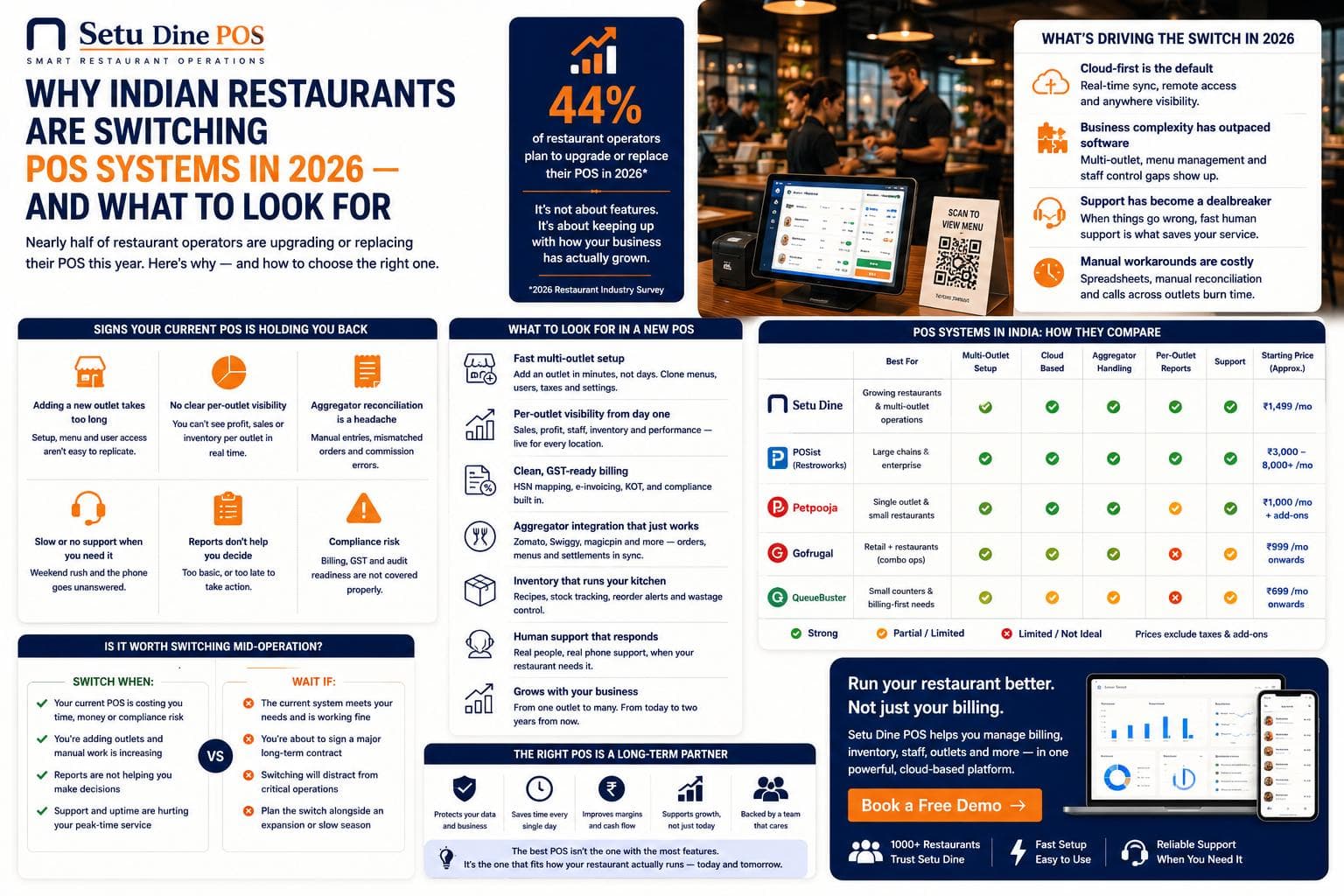
Thousands of restaurant owners across India are asking the same questions in 2026 — not because their current POS suddenly stopped working, but because their business grew and their software quietly stopped keeping up. More outlets. More delivery channels. More staff to manage. More complexity — and suddenly the billing system that felt fine for one location feels like a ceiling you keep bumping against.
The POS market in India is in the middle of a significant shift. Nearly half of restaurant operators plan to upgrade or replace their system this year. The question isn't whether to switch — it's what to switch to, and how to evaluate it properly without getting sold on features you'll never use.
This post breaks down what's driving the change, what actually matters when you're evaluating a new system, and how to match the right type of software to how your restaurant actually runs.
What's Driving the Switch in 2026
The pressure on restaurant POS systems in India has been building for a few years, and 2026 is the year it's boiling over for many operators.
Cloud-first has become the default. Restaurants that built on legacy, local-server POS systems are now dealing with the consequences: difficulty adding outlets, no remote visibility, manual data consolidation at the end of every day. Cloud-based systems — where everything syncs in real time and you can see your business from your phone — are now what operators expect, not a premium upgrade.
Business complexity has outpaced software. Most restaurant owners started with a single outlet and a POS that worked fine at that scale. Adding a second or third outlet exposed every gap: no centralised menu management, no cross-outlet reporting, no unified staff access control. Software that was never designed for multi-outlet operations doesn't become multi-outlet capable just by calling it that.
Support has become a dealbreaker. The most consistent complaint from restaurant owners who have switched systems isn't about features — it's about what happened when something went wrong. A POS crash at 8pm on a Saturday with 20 tables occupied and no one answering the support line is a defining moment. Operators who've lived through it once are unwilling to risk it again.
The cost of manual workarounds is visible now. End-of-day reconciliation in a spreadsheet. Monthly GST filing done manually from printed billing reports. Performance data that requires a phone call to each outlet manager to consolidate. These workarounds felt manageable at one outlet. At three or five, the cumulative time cost becomes significant enough to justify switching.
What Actually Matters When Evaluating a New POS
Most POS demos look impressive. The UI is clean, the features are plentiful, and everything works perfectly in a controlled environment. The real test is what happens on a busy Friday evening six months after you've signed up.
Before you commit to any system, evaluate these specifically — not from a feature list, but from a live walkthrough with your own restaurant's scenarios.
1. GST compliance that requires no manual input
India's restaurant GST structure is one of the most complex in any market. Dine-in, takeaway, packaged items, hotel restaurants, and QSR formats all have different applicable rates. A GST-compliant POS isn't one that allows you to set the right rate — it's one where the right rate is applied automatically based on order type, with no manual selection at the counter.
Ask any vendor: show me how a dine-in order and a takeaway order from the same menu item are billed differently. If the answer involves staff selecting a tax category manually, that's a source of daily billing errors.
2. Kitchen workflow — not just billing
Most operators evaluate POS systems on billing speed and interface simplicity. Few ask about what happens between billing and food reaching the table.
A KOT system that routes orders digitally to the correct kitchen station the moment they're placed — with modifications intact and sequence preserved — directly reduces peak-hour errors. Test this specifically: place a complex order with three modifications going to two different kitchen stations and watch what appears on the kitchen display.
If the kitchen display is an afterthought or an add-on, it will feel like one during service.
3. Multi-outlet capability as a core feature — not a workaround
There is a meaningful difference between a POS that was built for single-outlet restaurants and added multi-outlet later, and one where multi-outlet management was a design requirement from the start.
The tell: ask to see the centralised dashboard showing sales, order counts and performance for three outlets simultaneously, updated in real time. Ask how long it takes to add a new outlet to the system. Ask whether menu changes at one outlet can be pushed to all outlets from a single screen.
If any of these involve manual steps, exports, or calling a technician — the product wasn't built for multi-outlet.
4. Payment reconciliation without manual work
Cash, cards and UPI are all standard in Indian restaurants. What's not standard is automatic reconciliation — where every payment method is matched against every bill automatically, so your end-of-day picture is accurate without a reconciliation step.
Ask: can you show me the end-of-day reconciliation report? How long does it take to generate? Does it require any manual input?
5. Support you can reach during service hours
Every POS vendor will tell you they have good support. The question to ask is: if I have a billing system failure at 8pm on a Saturday, how do I reach someone, and what is the typical time to resolution?
Get a specific answer. If it involves email tickets and business-hours responses, that's an honest signal about what the support experience will actually be.
The Four Types of Restaurant POS in India — and Who Each One Suits
The restaurant software market in India broadly breaks into four categories. Understanding which category fits your situation is more useful than comparing feature lists.
Enterprise systems (built for chains with 20+ outlets)
These products are designed for large restaurant chains, hotel restaurant groups, and QSR enterprises with dedicated operations teams. They have deep feature sets, complex implementation timelines, and pricing structures that reflect that complexity. For a restaurant group at 20+ outlets with an in-house operations team, this tier makes sense. For a 3–5 outlet independent operator, it's significantly more than you need — and you'll pay for it in both cost and implementation time.
Inventory-heavy systems (built for retail-adjacent food businesses)
Some restaurant POS products have roots in retail inventory management and expanded into F&B. If your primary operational challenge is ingredient-level inventory tracking, raw material management, and supplier ordering — these products are worth evaluating. If your priorities are table management, kitchen workflow, and multi-outlet visibility, you may find the core restaurant operations features underdeveloped relative to the inventory module.
Budget / entry-level systems (built for single-outlet, low complexity)
There's a category of restaurant billing software in India priced very low and built to match: basic billing, basic GST, minimal configuration. For a brand-new single outlet with simple operations and low transaction volume, these are a reasonable starting point. The limitation is that they don't scale — adding a second outlet or more complex kitchen workflows typically requires a full migration.
Operator-first systems (built for real restaurants, scales from 1 to 20+ outlets)
This is where Setu Dine sits. The product is designed for the restaurant owner who is running a real business — existing outlets, active service, staff who need to be productive quickly — and needs software that respects that. GST is handled automatically. Kitchen orders route digitally to the right station. Multi-outlet dashboards are a core feature, not a bolt-on. The interface is built for a new staff member to be billing in minutes, not after a two-day training session.
This category suits operators who want a system that works from day one and scales without switching again when they open outlet three or five.
The Question Most Operators Don't Ask — But Should
Before signing up for any POS system, ask the vendor one question: how do you decide what to build next?
The answer tells you whether they're building software for operators — responding to real problems from real restaurant owners — or building software for the market, adding features that look good in comparisons and demos but don't change the daily experience of running a restaurant.
Software built for operators improves your Friday evening. Software built for the market improves the vendor's sales deck.
At Setu, the answer is straightforward: every feature in Setu Dine exists because a restaurant owner was losing time or money without it. Not because it was on a competitor's feature list. The operator is the starting point for every product decision.
A Practical Checklist Before You Switch
Before you make a final decision on any POS, run through this list:
- Watched a live demo with your specific restaurant scenario — your outlet count, your menu complexity, your service type
- Tested GST billing for dine-in and takeaway from the same item
- Seen the kitchen display with a multi-modification, multi-station order
- Seen the multi-outlet dashboard with real-time data (if applicable)
- Asked and received a specific answer about support response time during service hours
- Confirmed the end-of-day reconciliation requires no manual steps
- Confirmed adding a new outlet takes hours, not weeks
If you can check all of these, you're in a position to make a confident decision. If any of them were vague or skipped in the demo, ask again before you sign.
See How Setu Dine Handles All of This
Setu Dine is built for Indian restaurant operators — from single outlets to growing multi-outlet chains. GST compliance, kitchen routing, multi-outlet dashboards and UPI reconciliation are built in, not added on.
Setu Dine is still in development. Free Dine, the browser till it grows out of, runs a single outlet today — tables, kitchen tickets, split bills and GST, free forever and with no signup.
Frequently asked questions
Common triggers are opening a second or third outlet the current system can't replicate quickly, per-outlet reporting gaps, aggregator reconciliation pain, and support that doesn't answer fast enough.
More from Operations
Setu vs Marg ERP: Free Tools or a Licensed Retail ERP in 2026?
Marg ERP editions are publicly listed from about ₹5,550 to ₹26,000 exclusive of tax in October 2026, and the listings disagree on whether that is yearly or one-time. Setu's retail tools are free browser pages. Here is exactly where the line falls.
Read more →
Setu vs Swipe: Free Invoicing Tools or a Billing Account in 2026?
Swipe's paid plans start near ₹2,542 a year excluding GST as publicly listed in October 2026, and it keeps a free app tier. Setu's invoicing tools are free browser tools with no account and no sync. Here is exactly where the line between them falls.
Read more →
Setu vs myBillBook: Counter Billing and Stock for a Small Shop in 2026
myBillBook puts billing, stock and khata in one paid account, listed from ₹3,490 a year with a trial but no permanently free tier. Setu's billing, stock register and ledger tools are free with no cap. Here is how to tell which trade fits your shop.
Read more →
Setu vs Refrens: Quoting and Invoicing for a Service Business in 2026
Refrens is a real quote-to-payment platform for Indian service businesses, free to 15 documents and priced from ₹7,080 a year after that. Setu's quotation and invoice tools are free with no cap. Here is how to tell which trade fits your business.
Read more →