Food Courts and QSRs in 2026: Why Token Systems and Kitchen Displays Decide Who Wins the Lunch Rush
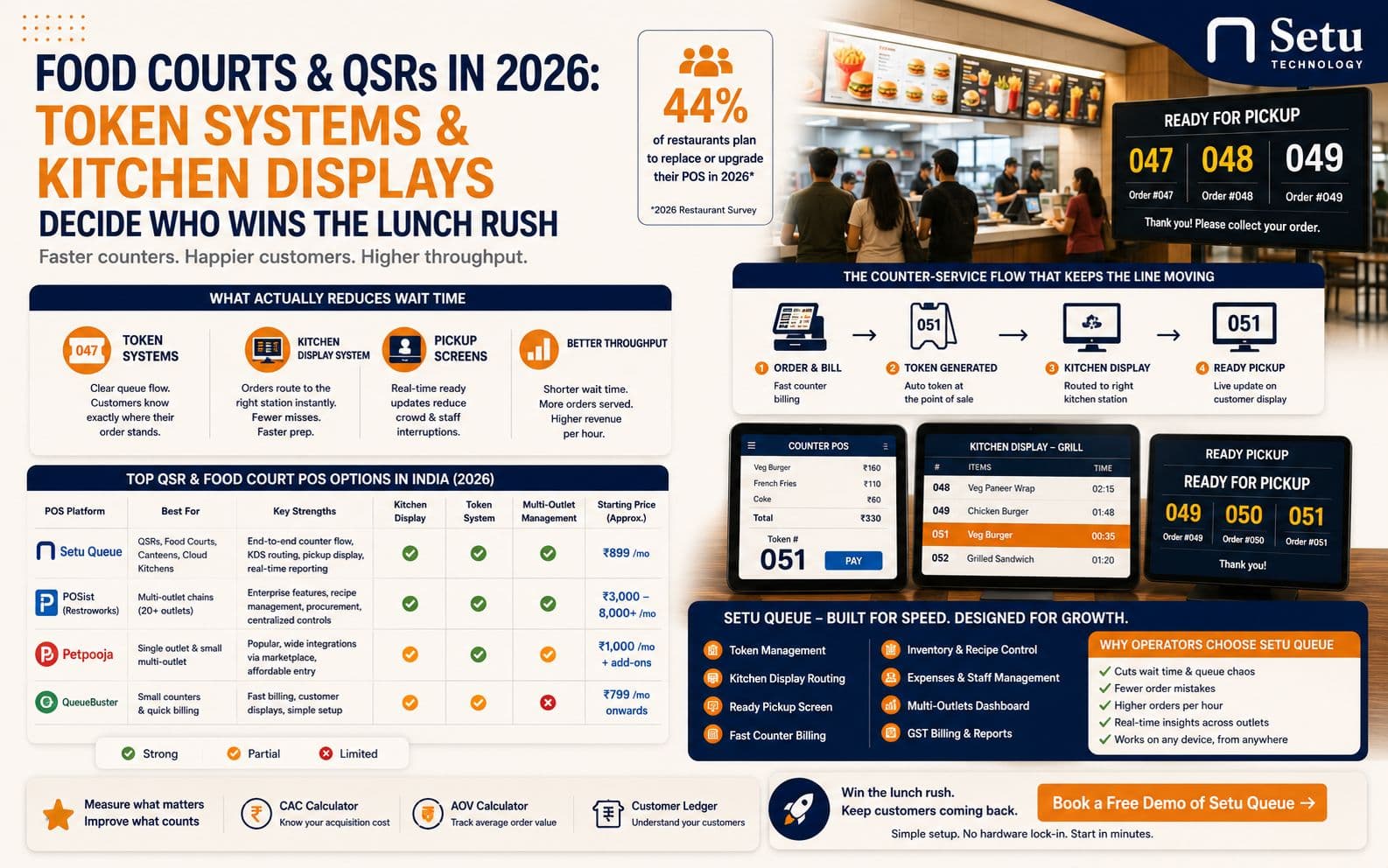
A table-service restaurant can survive a slow ticket. The guest is seated, there's a menu to read, maybe a drink already on the table. A quick-service counter or a food court stall doesn't get that grace period — the queue is standing three feet away, watching the till, and every extra minute is a customer deciding whether to wait or walk to the next stall. That's why the software question for QSRs and food courts isn't the same question it is for full-service restaurants. It's less about ambience and table turns, and much more about a single number: how long from “I'll have the number 4” to “order's up.”
We talk to counter-service operators every week, and in 2026 the same three friction points come up again and again: order-taking that's slower than it needs to be, kitchen tickets that don't route to the right station, and a pickup handoff that turns into a crowd of people squinting at a counter asking “is 47 ready yet?” None of these are exotic problems. But most POS systems were built for table service first and had counter workflows bolted on later, and it shows.
What actually slows a counter down
Strip away the marketing language and a QSR queue has four stages: order capture, payment, kitchen preparation, and pickup. Slowness at any one stage backs up the whole line — and most operators, when they finally time each stage instead of guessing, are surprised by where the minutes are actually going.
- Order capture — every extra screen tap or modifier menu adds seconds, and seconds multiply across a hundred orders at lunch.
- Payment — UPI is now the default in most Indian cities, but a POS that can't reconcile UPI, card, and cash in one flow creates a second bottleneck right after the first.
- Kitchen prep — if an order doesn't route cleanly to the right station (grill, fryer, beverage, assembly), someone in the kitchen is manually re-sorting tickets, which is exactly the kind of hidden delay that never shows up until you time it.
- Pickup — without a visible, accurate “ready” signal, customers crowd the counter and staff spend more time answering “where's my order” than actually running food.
Token systems are table stakes now, not a differentiator
A shared token or number display used to be a nice-to-have. In 2026, for any counter doing meaningful volume, it's assumed. What separates a good implementation from a mediocre one is whether the token number is generated automatically at the point of sale and pushed to a display in real time, versus written on a paper slip and typed in separately — the second version is where numbers get skipped, duplicated, or called out of order, which erodes trust in the system faster than almost anything else.
Kitchen display routing by station is where the real time gets saved
A QSR kitchen isn't one line, it's several: the grill or tandoor, the fryer, the beverage counter, the dessert or assembly station. When an order comes in for a combo meal, the burger needs to hit the grill screen, the fries need to hit the fryer screen, and the drink needs to hit the beverage screen — automatically, without a runner manually splitting the ticket. A kitchen display system (KDS) that does this correctly is one of the highest-leverage upgrades a counter-service operation can make, because it removes a manual coordination step that doesn't scale past a handful of orders an hour. It also creates a useful side effect most operators don't plan for: a timestamped record of how long each station actually takes per item, which is far more useful for staffing decisions than a gut feeling about who's “slow.”
The pickup screen is the most underrated piece of the stack
Operators spend a lot of budget on the ordering and kitchen side and then let the pickup moment run on shouted numbers. That's a mistake. A ready-pickup display that updates the moment an order is marked complete does two things at once: it cuts the “is my order ready” questions that pull staff away from actually preparing food, and it gives customers a clear, calm way to know when to step forward — which matters even more in food courts where multiple stalls are calling numbers into the same shared space and a customer genuinely can't tell which counter's shout was meant for them.
How the current options in India compare
For operators evaluating a QSR or food court POS in 2026, the landscape roughly breaks into three tiers:
- Petpooja remains the most widely adopted option for single-outlet and small multi-outlet QSRs, largely on the strength of its integration marketplace and relatively accessible pricing (reported to start around ₹1,000/month plus add-ons). Token and KDS capability typically comes through its marketplace integrations rather than as a native, unified module.
- POSist (now Restroworks) is built for scale — chains running 20–50+ outlets across cities, with centralized recipe standardization and regional pricing controls. That depth comes with a higher price point (commonly cited in the ₹3,000–8,000+/month range), which can be more than a single food-court stall or a small QSR chain needs.
- QueueBuster and similar billing-first tools are solid for fast checkout and customer-facing displays but are generally lighter on the kitchen-routing and multi-outlet reporting side.
None of these are wrong choices — they're built for different points on the size and complexity curve. The evaluation question for an operator isn't “which is the best POS,” it's “which one matches how my counter actually runs today, and where I expect it to be in two years.” A single food-court stall doing 150 orders a day and a five-outlet QSR chain doing 3,000 don't need the same system, even if both are technically “quick service.”
Where Setu Queue fits
We built Setu Queue specifically for counter-service businesses — QSRs, food courts, and canteens — as a distinct product from Setu Dine, which is built for table-service restaurants. The core idea is that token generation, kitchen display routing, and the ready-pickup screen shouldn't be three separate add-ons stitched together; they should be one connected flow from the counter to the kitchen to the handoff. Counter POS, Orders, Kitchen Display, and the Ready Pickup Screen sit on top of the same order record, so a ticket doesn't have to be re-entered or re-sorted as it moves through the stages. Underneath that, Inventory, Expenses, Staff, and Outlets reporting run off the same live data, so a multi-stall or multi-outlet operator can see which location is actually making money without waiting for an end-of-day spreadsheet.
What to check before you switch, regardless of which system you pick
- Does the token number generate automatically at billing, or does someone still write it down?
- Does the kitchen display route items to the correct station without manual re-sorting?
- Is there a customer-facing pickup screen, or are staff still calling out numbers over the counter noise?
- Can it reconcile UPI, card, and cash from one dashboard, with GST-compliant billing out of the box?
- If you run more than one outlet, can you see all of them — sales, inventory, staff — from a single screen, not one login per location?
The lunch rush isn't getting shorter and customer patience isn't getting longer. The operators who win it in 2026 are the ones who've removed every manual hand-off between the till and the tray.
Frequently asked questions
At counter-service volume, a clear token flow keeps the queue moving and tells customers exactly where their order stands — which directly decides how many covers you clear during the lunch rush.